Being able to integrate your WooCommerce store with ActiveCampaign is nothing new. ActiveCampaign has supported an integration with WooCommerce for many years, whereby you have been able to sync details of orders placed on your website directly into the contact records, allowing you to trigger automations on new purchases, manage abandoned carts and more.
However, until now, this integration only covered one-off purchases, not automatically recurring payments through WooCommerce Subscriptions. This meant you needed to find other ways to communicate with those customers.
Excitingly, this has now all changed! ActiveCampaign has just launched an update to their integration which now means that Recurring Payment data is synced to your ActiveCampaign account. This opens up a vast range of opportunities to engage with your subscribers. Whether you want to send them a personalised welcome email, upsell add-ons to their subscriptions, or remind them that their renewal is coming up; this is now all possible. So, grab yourself a cuppa and read on for details on how to set this up on your account – or, if you are not comfortable doing so, please do get in touch and let us help you!
But first, a few things to be aware of
As mentioned above, the recurring payments are only available when you are using the WooCommerce integration within your ActiveCampaign account. Specifically, you need to ensure you have installed:
- WooCommerce at 3.0 or higher
- The WooCommerce Subscriptions extension – Find out more here
- The ActiveCampaign for WooCommerce plugin
To then bring the Recurring Payment data into your ActiveCampaign contact records, you will need to run a “Historical Sync” from the ActiveCampaign plugin settings in WordPress. Data from any new subscription orders will automatically be synced through as usual.
You then create the Integration by navigating to your ActiveCampaign Settings and selecting “Integrations” from the sub-menu. Add a new WooCommerce integration if you do not have one already, and follow the instructions shown there.
Of course, we are here to help if you need some assistance getting this set up. 😊
Where do I find the Recurring Payment details?
Once you have set the above up and run your historical sync, you can find the recurring payment details in the Ecommerce section of your contact records.
For those of you who have never used this integration before, the Ecommerce section is added underneath towards the bottom of the contact screen, underneath the Tags/Lists/Automations.

The screenshot above shows the default fields displayed on the Recurring Payments tab. You can see further details by clicking – you guessed it – on the “Details” button against each row.
Alternatively, if you wanted to see other details in this section by default, you can change this by going to your ActiveCampaign Settings and selecting “Manage Data” from the sub-menu and then selecting “Recurring Payments” from the list. Once there, simply drag and drop the fields into the order you wish to see them. Do be aware though that the Contact record will only ever show the first 5 fields in the list.
One thing I did notice is that, for some reason, the currency symbol displayed against the Payment Amount field Dollars, even though the subscription may be taken in Pound Sterling. The subscription currency is recorded correctly in the Details, just not translated over to the display. Just something to watch out for.
Segmentation options
Of course, having the data in your ActiveCampaign account does not do you much good if you cannot make use of it, which is why, once the integration has been setup, you will immediately see Ecommerce options displayed in your segmentation options, whether you are using those in the Advanced Search, Campaign segmentation or Automation conditions.
When you select the Recurring Payments condition, you have access to all the fields included in that data sync, meaning you can filter on things such as Status,
Automation triggers
In addition to being able to segment on the Recurring Payment data, the integration also provides you with a couple of new Automation triggers.
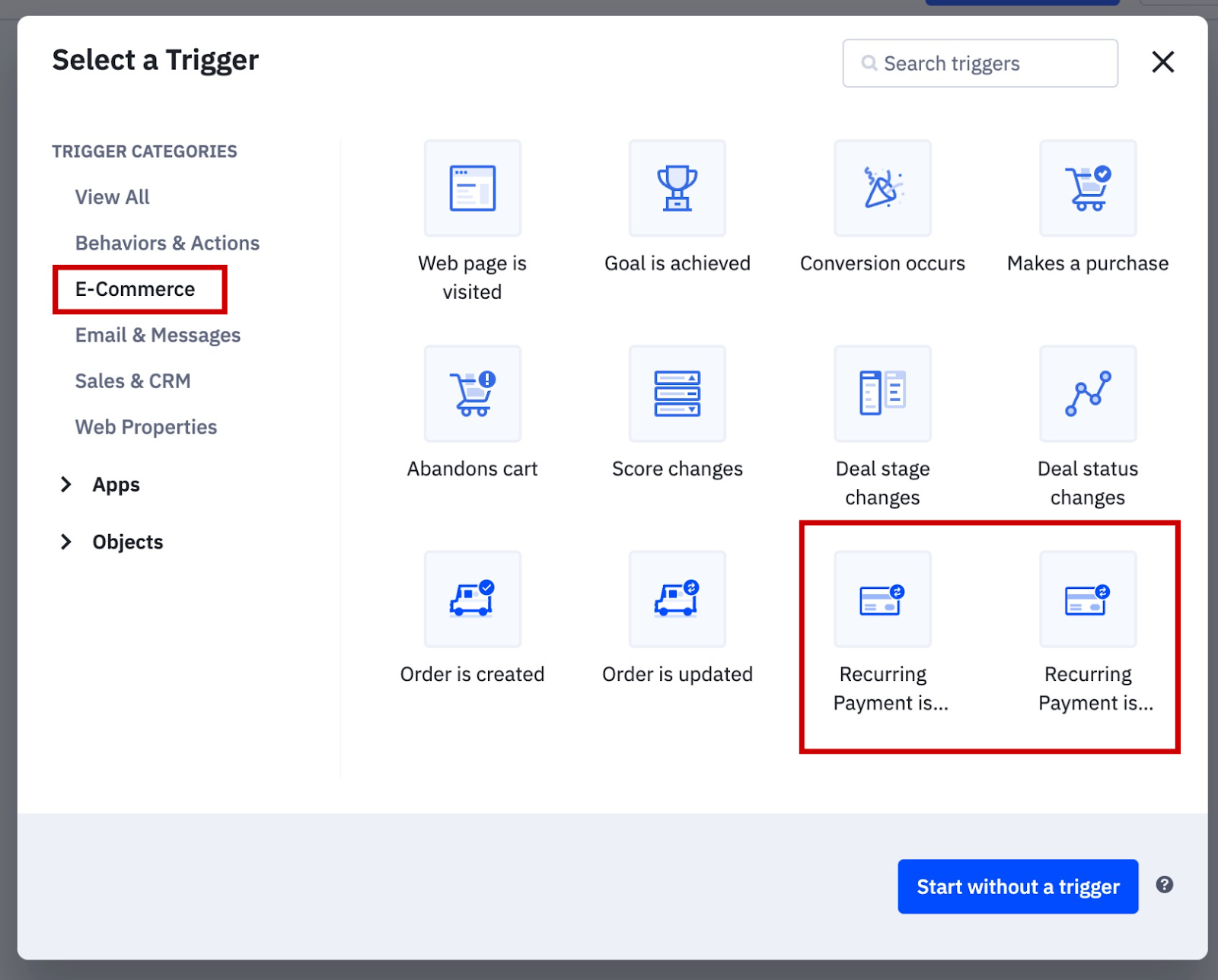
The two triggers are:
Recurring Payment Created
This option triggers the automation whenever a new Recurring Payment is created in your WooCommerce site.
When setting up this trigger you can choose from two options:
All Recurring Payments
Selecting this option will pull in any contact that sets up a new Recurring Payment.
Segment Recurring Payments
By selecting this option, you can create a segment based on the Recurring Payment data to specify what criteria will cause the automation to run for a particular contact.
For example, imagine you wanted to have a specific automation that runs for any contacts whose subscription has a trial period, you could use the “Is Trial” field to create the segmentation.

Of course, as with all the segmentation areas throughout ActiveCampaign, you can add multiple conditions, to home in on your target audience.
Recurring Payment Updated
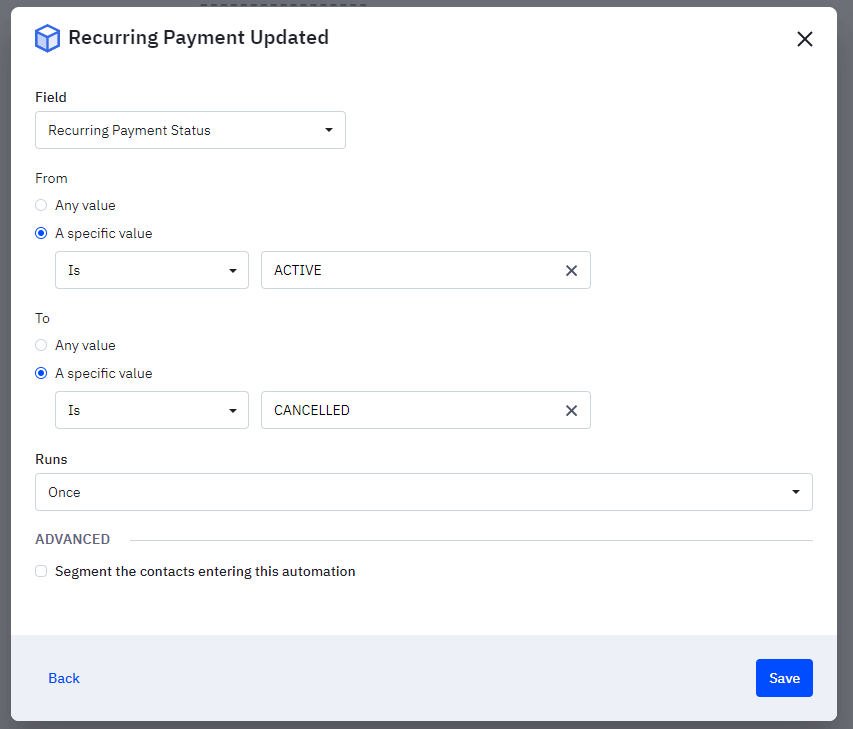
When you select this trigger, the automation starts whenever a one of the Recurring Payment fields changes from one value to another, e.g. the status changes from “Active” to “Cancelled”.
The settings for this trigger include:
Field:
Select the Recurring Payment field that will trigger the automation, e.g. the “Recurring Payment Status” to allow for the above example.
“From” and “To” field status:
Where you determine which changed to the field will trigger the automation.
Runs:
Here you specify how often you are happy for the automation to run for each contact. If you select “Once”, the automation will only every trigger a single time for each contact. “Multiple” obviously allows a contact to enter the automation more than once.
This really is an exciting new feature which can help you get the most out of your WooCommerce subscriptions. By creating automations and using segmentation to target your subscribers, you can generate engagement and maximise on your revenue much more easily.
If you want to chat about how we can help you get the most out of your subscriptions using your ActiveCampaign account, do drop us a line on hello@zephi.co.uk or call us on 01543 523 950.